Beck Online & E-Library
Here's how to unlock your account:
1) Install the data centre's VPN client and use it to log into the university network. You can also use VPN to access other databases (e.g. juris) and all of the University Library's e-books (via the catalogue).
2) Go to the Database Information System (DBIS) page
- Select Law
- Select database
- Open link with left click
- You will be redirected to the desired page and logged in automatically
3) Once you are logged in via VPN, a login window for personal registration will appear on the right-hand side of beck-online with the heading ‘Wuerzburg, UB’.
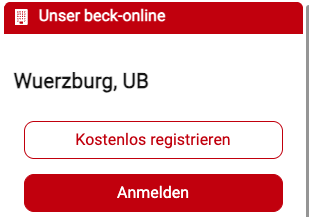
If this window does not appear, either the VPN connection has been disconnected or the window is hidden. To display it, click on the two small red arrows.

4) Create your account, when registering, please use your student email address (@stud-mail.uni-wuerzburg.de).
Support:
If you have any further questions, please feel free to contact us by email (legaltechcenter@uni-wuerzburg.de). If we are not able to provide support, we will ask you to contact Beck Online support.